
Video
A Video layer plays a video file in a scene: an intro, a background loop, a clip to react to. Its sound goes to the scene’s audio mixer as its own track.
To add one, choose Add › Video above the sidebar, or press ⇧⌘V, then click the folder button in the inspector to choose a file. You can also drag a video file from the Finder onto the canvas. In Multiview, drop it on the frame of the scene you want it in.
Camera Graph opens MP4, QuickTime (MOV) and other movie files macOS can play, and AVI.
Settings
Section titled “Settings”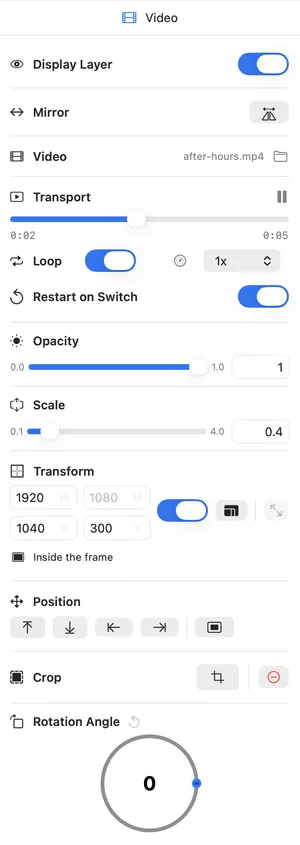
| Setting | Description |
|---|---|
| Display Layer | Shows or hides the layer. |
| Mirror | Flips the picture horizontally. |
| Video | The file’s name, and the folder button to choose another file. If the file can’t be opened, the reason shows here. |
| Transport | The play and pause button. Under it, drag the seek bar to jump to a point in the video. The elapsed time and the length show under the bar. |
| Loop | Plays the video again from the start when it ends. |
| Speed | Plays the video at 0.25x, 0.5x, 1x, 1.5x or 2x. |
| Restart on Switch | Starts the video from the beginning each time its scene goes live. On by default. |
| Opacity, Scale, Transform, Position, Crop, Rotation Angle | See Common layer settings. |
A video’s sound plays only while its scene is live. On the Multiview canvas, and while its scene transitions out, the picture keeps playing but the sound is silent. Set the video’s level with its track in the mixer.
- The inspector says the file can’t be accessed.
The file was moved, renamed or deleted since you added it. Click the folder button and choose it again.
- How do I play a video once when its scene comes up?
Turn off Loop and leave Restart on Switch on. The video starts from the beginning each time the scene goes live and stops at the end.
Shortcuts
Section titled “Shortcuts”| Name | Keyboard Controls |
|---|---|
| Add Video | ⇧⌘V |
| Crop / Exit Crop | ⌥⌘C / ⌥⌘↩ |
For moving, nudging, locking and hiding layers, see Canvas and Multiview and Keyboard Shortcuts.