
Filters
Filters are real-time effects you put on a layer or on a whole scene. Camera Graph has 119 effects that run all the time and 120 one shots that play once when you fire them. They work on every kind of layer: cameras, screen shares, browsers, videos, images, text and shapes.
A scene can also have a transition, which plays when you cut to it. You add transitions from the scene’s inspector, not from the drawer.
Add an effect
Section titled “Add an effect”- Select a layer in the sidebar or on the canvas. To affect everything in a scene, select the scene instead.
- Open the drawer under the preview with its Filters tab, or press ⇧⌘Y.
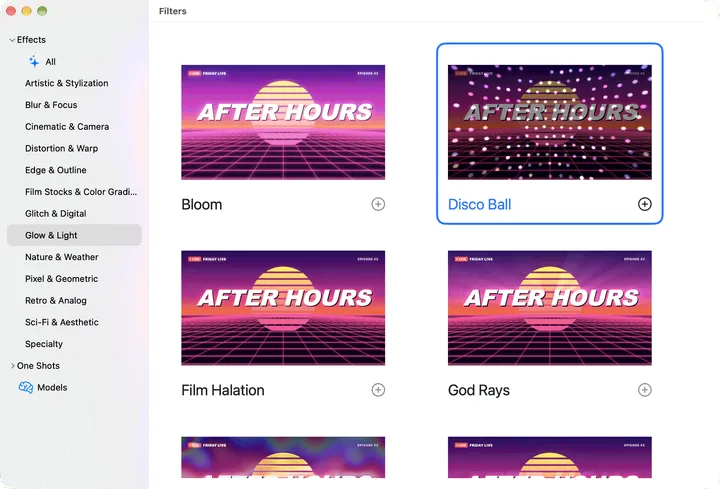
- Click Add Filter. The Filters window opens.
- Pick a category in the sidebar, then click the + on a tile. You can also double-click the tile, or select it and press Return.
When you add an effect, its tile briefly turns green with a checkmark. Every tile plays a live preview of the selected layer, so you see the result before you add it.
Add Filter is dimmed until a layer or scene is selected. The Filters tab shows how many effects the selected layer has, for example “Filters 3”.
The Filters window sidebar
Section titled “The Filters window sidebar”| Section | What it lists |
|---|---|
| Transitions | Scene transitions. Shown only while a scene is selected. |
| Effects | All, then each effect category. |
| One Shots | All, then each one shot category. |
| Models | Core ML models you can download or load. See ML Models. |
Work with effect cards
Section titled “Work with effect cards”Each effect on the selected layer is a card in the drawer, left to right in the order they apply.
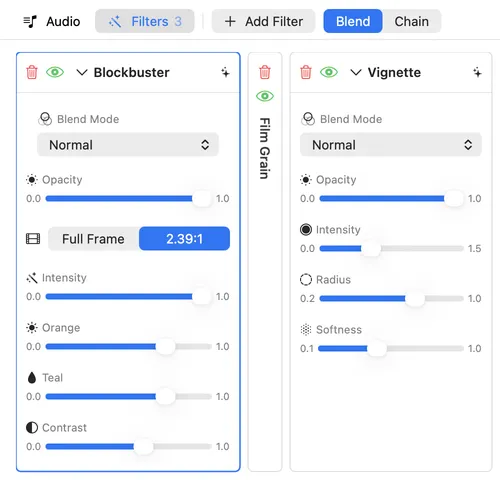
| Control | What it does |
|---|---|
| Trash | Removes the effect. |
| Eye | Shows or hides the effect without removing it. |
| Name menu | Click the effect’s name to swap it for any other effect or one shot, grouped by category. The new effect keeps the slot, blend mode, opacity and on/off state. |
| Rest of the header | Folds the card to a narrow strip. Click the strip to open it again. |
| Blend Mode | How the effect’s result combines with the layer. See Blend modes. |
| Opacity | How strongly the effect shows, from 0 to 1. |
| Settings | The effect’s own sliders, pickers and colors. The gallery below lists them for every effect. |
An effect’s Opacity and its sliders can be mapped to a MIDI fader or knob. See MIDI.
Swap effects quickly
Section titled “Swap effects quickly”While the Filters tab is open, press ⌥← or ⌥→ to swap the selected card for the previous or next effect in the catalog. The order runs through every effect, then every one shot, and wraps at the ends. The selected card has an accent outline. Hover a card, or Tab to its header, to select it.
This is a fast way to try looks on a live layer without opening the Filters window.
Reorder cards
Section titled “Reorder cards”Drag a card left or right. You can also right-click a card and choose Move Up or Move Down. VoiceOver offers the same two actions on each card.
Resize the drawer
Section titled “Resize the drawer”Drag the grip at the top of the drawer, or drag empty space in the drawer’s tab bar. Right-click either one to pick Small, Medium or Large. To collapse the drawer, click the tab that is showing or press ⇧⌘Y.
How effects stack
Section titled “How effects stack”The segmented control next to Add Filter sets how a layer’s effects combine.
| Mode | What happens |
|---|---|
| Blend | The default. Every effect runs on the original layer. The results are layered in card order, first card at the bottom, and mixed by each card’s blend mode and opacity. One shots draw on top of all of that while they play, in card order, so several fired together mix. |
| Chain | Each effect runs on the output of the card before it, left to right. Use it when one effect should feed the next, for example Pixellate into CRT. Blend mode and opacity have no effect in Chain. |
On a layer with transparency, such as a camera with its background removed, text or a PNG, effects stay inside the layer’s shape. On a scene they cover the whole frame.
Blend modes
Section titled “Blend modes”Normal, Darken, Multiply, Color Burn, Linear Burn, Darker Color, Lighten, Screen, Color Dodge, Add (Linear Dodge), Lighter Color, Overlay, Soft Light, Hard Light, Vivid Light, Linear Light, Pin Light, Hard Mix, Difference, Exclusion, Subtract, Divide, Hue, Saturation, Color, Luminosity and Color Lookup 512x512.
Screen and Add suit glow and light effects. Multiply darkens. Overlay and Soft Light add contrast.
- Can I put effects on a whole scene?
Yes. Select the scene, then add effects the same way. They apply over every layer in the scene.
- Can I undo a change to an effect?
Yes. Adding, removing, swapping, reordering and moving a slider can all be undone with ⌘Z.
- Why is Add Filter dimmed?
Nothing is selected. Select a layer or a scene first.
Shortcuts
Section titled “Shortcuts”| Name | Keyboard Controls |
|---|---|
| Show or Hide Drawer | ⇧⌘Y |
| Swap Selected Effect to Previous | ⌥← |
| Swap Selected Effect to Next | ⌥→ |
| Undo | ⌘Z |
All effects
Section titled “All effects”Every effect by category, with its settings and their ranges. Clips play while they are on screen.
Artistic & Stylization20
All categoriesASCII
Redraws the picture as glowing text characters on a terminal screen.
ParameterRange Default ColorPhosphor Green (default) · Amber · Source Color · Mono Cell Sizerange 6–32 10 Glowrange 0–1 0.5 Intensityrange 0–1 1 Comic
Turns the picture into an inked comic book drawing.
Cross Hatch
Shades the picture with bold crossed pen lines.
ParameterRange Default Densityrange 100–600 300 Daguerreotype
Silvery blue-gray monochrome with a dark vignette, like an early photograph.
ParameterRange Default Intensityrange 0–1 1 Engraving
Banknote-style line engraving with crosshatched shadows and ornament.
ParameterRange Default InkBlack (default) · Money Green · Sepia · Steel Blue Line Densityrange 40–160 90 Contrastrange 0.5–2 1.2 Guillocherange 0–1 0.35 Intensityrange 0–1 1 Halftone
Newsprint dots in four slightly misaligned ink colors.
ParameterRange Default Dot Sizerange 8–60 24 Misregistrationrange 0–1 0.35 Newsprintrange 0–1 0.6 Intensityrange 0–1 1 Oil Painting
Smooths the picture into flat, painterly brush strokes.
ParameterRange Default Radiusrange 1–5 5 Color Levelsrange 0–16 0 Paper Texture
Lays a subtle paper or canvas grain over the picture.
ParameterRange Default Intensityrange 0–1 0.3 Scalerange 0.1–5 1 Pencil Sketch
Draws the picture as a pencil sketch with hatching.
ParameterRange Default Densityrange 100–800 400 Pointilize
Rebuilds the picture from a grid of round colored dots.
ParameterRange Default Radiusrange 1–50 20 Risograph
Two-color fluorescent ink print with grain and misregistration.
ParameterRange Default InksPink / Blue / Yellow (default) · Pink / Teal · Red / Navy Dot Sizerange 3–16 8 Misregistrationrange 0–1 0.5 Grainrange 0–1 0.5 Paper Toothrange 0–1 0.5 Intensityrange 0–1 1 Stained Glass
Breaks the picture into colored glass cells with dark leading.
ParameterRange Default Cell Sizerange 10–80 30 Border Widthrange 0.01–0.15 0.05 Stipple
Draws the picture with dots that cluster in the shadows.
ParameterRange Default Dot Sizerange 2–16 6 Sumi Ink
Japanese ink wash with brushy edges on rice paper.
ParameterRange Default Strokesrange 0–2 1 Washrange 0–1 0.7 Bleedrange 0–1 0.5 Rice Paperrange 0–1 0.6 Vermilion Accentrange 0–1 0.3 Intensityrange 0–1 1 Tesserae
Rebuilds the picture as a Roman mosaic of stone tiles.
ParameterRange Default Tile Sizerange 12–80 30 Groutrange 0–1 0.35 Irregularityrange 0–1 0.5 Reliefrange 0–1.5 1 Intensityrange 0–1 1 Toon
Flat cartoon colors with dark outlines.
Woodcut
Bold black-and-white carved print, like a linocut.
ParameterRange Default Densityrange 50–500 200 Thresholdrange 0.1–0.9 0.5
Blur & Focus4
All categoriesDirectional Blur
Motion blur streaked along one angle.
ParameterRange Default Anglerange 0–6.28 0 Amountrange 0–0.05 0.01 Samplesrange 4–24 12 Radial Blur
Sharp center with edges streaking outward.
ParameterRange Default Amountrange 0–0.1 0.02 Samplesrange 4–32 16 Tilt Shift
A sharp band with blur above and below, like a miniature model.
ParameterRange Default Focus Positionrange 0–1 0.5 Focus Widthrange 0.01–0.5 0.2 Blur Radiusrange 0–15 5
Cinematic & Camera8
All categoriesBlockbuster
Teal-and-orange movie grade with punchy contrast and optional widescreen bars.
ParameterRange Default LetterboxFull Frame · 2.39:1 (default) Intensityrange 0–1 1 Orangerange 0–1 0.75 Tealrange 0–1 0.75 Contrastrange 0–1 0.6 Bloomrange 0–1 0.5 Bokeh
Bright highlights turn into soft out-of-focus discs.
ParameterRange Default Thresholdrange 0.3–1 0.7 Radiusrange 2–20 8 Chroma
Makes one color, such as a green screen, transparent.
ParameterRange Default Sensitivityrange 0–0.5 0.3 Smoothrange 0–0.5 0.3 Chroma Color #00FF00 Day for Night
Makes daylight footage look like moonlit night.
ParameterRange Default Intensityrange 0–1 1 Darknessrange 0–1 0.65 Moonlightrange 0–1 0.8 Sky Crushrange 0–1 0.75 Vignetterange 0–1 0.6 Letterbox
Black bars that crop the picture to a cinema aspect ratio.
ParameterRange Default Aspect Ratiorange 1.33–2.76 2.39 Ripple Pool
Rings ripple out from the center like a stone dropped in water.
ParameterRange Default Amplituderange 0–0.05 0.03 Frequencyrange 5–50 20 Speedrange 0.5–10 3 Vignette
Darkens the corners to draw the eye to the center.
ParameterRange Default Intensityrange 0–1.5 0.5 Radiusrange 0.2–1 0.75 Softnessrange 0.1–1 0.45
Distortion & Warp14
All categoriesAnamorphic Streak
Bright spots throw long blue horizontal lens streaks.
ParameterRange Default Thresholdrange 0.5–1 0.8 Streak Lengthrange 5–40 15 Broken Mirror
Shatters the picture into shards knocked slightly out of place.
ParameterRange Default Shardsrange 3–20 8 Shard Offsetrange 0–1 0.8 Cracksrange 0–1 0.85 Impact Xrange 0–1 0.42 Impact Yrange 0–1 0.42 Chromatic Aberration
Splits the red, green and blue channels apart.
ParameterRange Default Offsetrange 0–20 5 Anglerange 0–6.28 0 Crystal Ball
A glass sphere showing the scene magnified and upside down.
ParameterRange Default Radiusrange 0.05–0.5 0.33 Position Xrange 0–1 0.5 Position Yrange 0–1 0.5 Refractionrange 0–1 1 Dim Surroundrange 0–1 0.5 Droste
A spiral that zooms endlessly into a copy of itself.
ParameterRange Default Intensityrange 0–1 1 Spiral Armsrange 0–4 1 Zoom Speedrange −2–2 0.6 Recursion Scalerange 1.5–8 3 Framerange 0–1 0.7 Funhouse
Carnival mirror bands that stretch and squash the picture.
ParameterRange Default Strengthrange 0–1 0.85 Bandsrange 1–8 2.5 Speedrange 0–2 0.5 Chrome Sheenrange 0–1 0.35 Wobblerange 0–1 0.5 Gravity Well
Pulls the picture toward a point like a gravity well.
ParameterRange Default Strengthrange 0–1 0.3 Radiusrange 0.1–1 0.5 Lens Distortion
Barrel or pincushion bending with a darkened edge.
ParameterRange Default Distortion K1range −1–1 0.2 Distortion K2range −0.5–0.5 0 Vignetterange 0–1 0.3 Liquid Glass
Looking through moving, wobbling glass.
ParameterRange Default Distortionrange 0–0.1 0.03 Speedrange 0.1–5 1 Magnetic Warp
Invisible fields push and drag the picture around.
ParameterRange Default Amountrange 0–0.1 0.02 Speedrange 0.1–5 1 Mandala
Mirrored kaleidoscope wedges slowly spinning around a glowing center.
ParameterRange Default Intensityrange 0–1 1 Segmentsrange 3–24 8 Spinrange −1–1 0.15 Zoomrange 0.5–3 1 Bloomrange 0–1 0.5 Perlin Warp
Swirling, smoke-like warping of the whole picture.
ParameterRange Default Amountrange 0–0.5 0.1 Iterationsrange 1–5 3 Reeded Glass
Seen through fluted glass ribs that bend and split the light.
ParameterRange Default Intensityrange 0–1 1 Ribsrange 6–120 36 Refractionrange −2–2 1 Anglerange 0–180 0 Specularrange 0–1 0.6 Frostrange 0–1 0.3 Tiny Planet
Wraps the picture into a little planet, or a tunnel.
ParameterRange Default ProjectionPlanet (default) · Tunnel Intensityrange 0–1 1 Zoomrange 0.3–3 1 Rotationrange 0–1 0 Spinrange −2–2 0
Edge & Outline6
All categoriesBlueprint
White line drawing on blueprint blue with a drafting grid.
ParameterRange Default Line Strengthrange 0.5–3 1.5 Thresholdrange 0–0.5 0.12 Grid Sizerange 10–80 24 Ghost Imagerange 0–1 0.25 Paperrange 0–1 0.5 Intensityrange 0–1 1 Colored Edges
Bright colored outlines on black.
Rotoscope
Flat cel shading with wobbly sketched ink lines on paper.
ParameterRange Default Tone Levelsrange 2–6 4 Line Weightrange 0–2.5 1.2 Line Boilrange 0–1 0.6 Colorrange 0–1 0.35 Paperrange 0–1 0.6 Intensityrange 0–1 1 Topographic
A contour map with brightness shown as elevation.
ParameterRange Default Contour Levelsrange 4–40 14 Line Widthrange 0.5–4 1.2 Map Tintrange 0–1 0.85 Driftrange 0–1 0.2 Intensityrange 0–1 1 Wireframe
A 3D wire mesh with brightness as height.
ParameterRange Default Grid Sizerange 5–50 20 Heightrange 0.01–0.3 0.1
Film Stocks & Color Grading12
All categoriesBleach Bypass
Low saturation and hard contrast for a gritty, silvery look.
ParameterRange Default Intensityrange 0–1 1 Cinestill 800T
Cool tungsten film look with red glow around bright lights.
Duotone
Maps shadows and highlights to two colors you choose.
ParameterRange Default Shadow Color #0C0C4C Highlight Color #FFE599 Expired Film
Faded, color-shifted old film with heavy grain.
ParameterRange Default Severityrange 0–1 0.75 False Color
Exposure check that paints brightness levels in diagnostic colors.
Gradient Map
Recolors the picture through a preset color gradient.
ParameterRange Default Presetrange 0–3 0 Infrared Film
Infrared film look: glowing pale foliage and dark skies.
ParameterRange Default Intensityrange 0–1 0.8 Kodachrome
Rich reds and yellows, deep blacks and cool shadows.
Monochrome
Tones the picture in one color, keeping its shadows and highlights.
ParameterRange Default Intensityrange 0–1 1 Color #FF0000 Portra 400
Soft portrait film look with creamy skin tones.
Glitch & Digital4
All categoriesBitcrush
Over-compressed JPEG blocks, color bleed and corrupt tiles.
ParameterRange Default Intensityrange 0–1 1 Block Sizerange 4–32 12 Crunchrange 0–1 0.85 Chroma Bleedrange 0–1 0.85 Corruptionrange 0–1 0.6 Datamosh
Smearing compression blocks, like a broken video stream.
ParameterRange Default Block Sizerange 4–64 16 Glitch Intensityrange 0–1 0.5 Glitch
Flickering digital displacement and color tearing.
Pixel Drip
Bright pixels smear and drip downward in streaks.
ParameterRange Default Intensityrange 0–1 1 Thresholdrange 0–1 0.5 Drip Lengthrange 0–1 0.55 Speedrange 0–2 0.5 Streak Widthrange 1–20 4
Glow & Light9
All categoriesBloom
Bright areas spill a soft glow into their surroundings.
ParameterRange Default Intensityrange 0.1–5 1 Radiusrange 1–50 10 Disco Ball
Mirror-ball light specks sweep across a dimmed room.
ParameterRange Default Spin Speedrange 0–2 0.5 Densityrange 4–30 12 Speck Sizerange 0–1 0.5 Room Dimrange 0–0.9 0.45 Colorrange 0–1 0.35 Intensityrange 0–1.5 1 Film Halation
Red-orange glow bleeds from highlights, like light scattering in film.
ParameterRange Default Intensityrange 0–1 0.85 God Rays
Shafts of light stream out from bright areas.
ParameterRange Default Intensityrange 0–1.5 0.5 Decayrange 0.8–0.99 0.95 Samplesrange 10–60 30 Iridescent
Holographic foil sheen with shifting rainbow colors.
ParameterRange Default Mixrange 0–1 0.75 Shimmer Speedrange 0–2 0.5 Film Thicknessrange 0.5–4 1.5 Sparklerange 0–1 0.5 Lens Flare
A lens flare with ghosts and a starburst over bright spots.
ParameterRange Default Intensityrange 0–1.5 0.5 Neon Glow
Edges glow and pulse like neon tubing.
ParameterRange Default Edge Thresholdrange 0.05–0.8 0.2 Glow Intensityrange 0–5 1.5 Redrange 0–1 1 Greenrange 0–1 0 Bluerange 0–1 1 Prism Glow
Soft glow with color fringing, ripple and grain.
ParameterRange Default Amountrange 0–1 0.8 Aberration (px)range 0–6 2 Glowrange 0–1 0.35 Ripple Amp (px)range 0–4 1.5 Ripple Freqrange 5–60 30 Grainrange 0–1 0.2 Vignetterange 0–1 0.35 Bloom Threshrange 0–1 0.6 Saturationrange −0.5–1 0.2 Contrastrange −0.5–1 0.15 Scanlinerange 0–1 0.15 Stage Lights
Colored concert spotlights sweep through haze.
ParameterRange Default PaletteConcert (default) · Warm · Club Sweep Speedrange 0–2 0.6 Beam Widthrange 0.4–2 1 Hazerange 0–1 0.6 House Lights Downrange 0–0.95 0.7 Intensityrange 0–1.5 1
Nature & Weather11
All categoriesAurora
Northern lights and stars ripple across the dark areas.
ParameterRange Default Intensityrange 0–1.5 1 Speedrange 0–2 0.5 Heightrange 0.1–0.9 0.55 Darks Onlyrange 0–1 0.7 Hue Shiftrange 0–1 0 Starsrange 0–1 0.4 Caustics
Underwater light ripples with a blue-green tint.
ParameterRange Default Intensityrange 0–1 1 Causticsrange 0–1.5 0.8 Scalerange 0.5–4 1.6 Speedrange 0–2 0.6 Wobblerange 0–1 0.4 Water Tintrange 0–1 0.7 Embers
Glowing embers and sparks drift up from a warm glow.
ParameterRange Default Amountrange 0–1 0.7 Speedrange 0–3 1 Sizerange 0.5–2 1 Fire Glowrange 0–1 0.6 Heat Hazerange 0–1 0.5 Fire
Flames rise from the bottom of the frame.
Fog
Banks of fog drift across, thickest near the ground.
ParameterRange Default Densityrange 0–1 0.8 Heightrange 0.1–1 0.6 Driftrange 0–2 0.6 Scalerange 0.5–3 1 Shadow Liftrange 0–1 0.5 Rain on Glass
Raindrops slide down fogged glass in front of the scene.
ParameterRange Default Rainrange 0–1 0.7 Speedrange 0–3 1 Drop Sizerange 0.5–2.5 1 Fogrange 0–1 0.6 Refractionrange 0–2 1 Sakura
Cherry blossom petals tumble across the frame.
ParameterRange Default Amountrange 0–1 0.6 Speedrange 0–3 1 Windrange −1–1 0.35 Sizerange 0.5–2 1 Pink Bloomrange 0–1 0.5 Sea
A gentle wavy shimmer, as if seen through water.
Snow
Snowflakes fall over the picture.
Storm
Rain runs down the screen with flashes of lightning.
ParameterRange Default Rain Amountrange 1–200 20 Water
The bottom of the frame becomes a rippling reflection.
Pixel & Geometric7
All categoriesBrick Build
Rebuilds the picture from studded toy bricks.
ParameterRange Default Stud Sizerange 8–48 18 Brick Colorsrange 0–1 0.9 Reliefrange 0–1.5 1 Seamsrange 0–1 0.6 Intensityrange 0–1 1 Dither
Retro dithered pixels in classic console and computer palettes.
ParameterRange Default PaletteGame Boy (default) · Mac 1-Bit · CGA · PICO-8 · Virtual Boy Pixel Sizerange 1–12 3 Ditherrange 0–1.5 1 Contrastrange 0.5–2 1.1 LCD Gridrange 0–1 0.25 Intensityrange 0–1 1 Hexels
Hexagon pixels with beveled edges and glowing gaps.
ParameterRange Default Hex Sizerange 8–96 36 Bevelrange 0–1 0.6 Gaprange 0–1 0.35 Gap Glowrange 0–1 0.5 Intensityrange 0–1 1 LED Wall
The picture shown on a stadium LED screen.
ParameterRange Default LED Pitchrange 6–48 16 Bloomrange 0–1 0.6 Panel Variancerange 0–1 0.5 RGB Subpixelsrange 0–1 1 Intensityrange 0–1 1 Trixel
Triangle pixels that slowly rotate and subdivide.
Retro & Analog10
All categoriesBroadcast Scan Lines
Horizontal scan lines like a broadcast monitor.
ParameterRange Default Line Countrange 50–1000 400 Darknessrange 0–1 0.3 Camcorder
1990s camcorder look with a REC and timecode overlay.
ParameterRange Default Chroma Bleedrange 0–1 0.6 Interlacerange 0–1 0.6 Video Noiserange 0–1 0.4 REC Overlayrange 0–1 1 Intensityrange 0–1 1 CRT
Curved old TV tube with scan lines and glow.
Dust & Scratches
Dust specks and scratches drift across like old film.
ParameterRange Default Intensityrange 0–1 0.4 Gate Weave
Subtle frame wobble, like film in a projector gate.
ParameterRange Default Amountrange 0–0.01 0.01 Light Leaks
Warm film light leaks bleed in from the edges.
ParameterRange Default PaletteSunset (default) · Golden Hour · Cosmic · Prism Intensityrange 0–1.5 0.8 Drift Speedrange 0–2 0.4 Leak Sizerange 0.3–1.5 0.8 Flickerrange 0–1 0.3 Super 8
Faded, grainy home movie with flicker and wobble.
ParameterRange Default Grainrange 0–1 0.7 Gate Weaverange 0–1 0.6 Faderange 0–1 0.6 Flickerrange 0–1 0.5 Light Struckrange 0–1 0.5 Intensityrange 0–1 1 Test Pattern
SMPTE color bars blended over the picture.
ParameterRange Default Pattern Opacityrange 0–1 0.5 VHS
Smeared color, noise and tracking wobble of a worn VHS tape.
ParameterRange Default Intensityrange 0–1 1
Sci-Fi & Aesthetic9
All categoriesActive Camo
A shimmering, see-through cloak with a hexagon sheen.
ParameterRange Default Cloakrange 0–1 0.85 Refractionrange 0–2 1 Shimmerrange 0–1 0.6 Chromatic Fringerange 0–1 0.7 Cracklerange 0–1 0.3 Hex Shimmerrange 0–1 0.6 Cyberpunk
Neon-saturated colors with crushed shadows and color fringing.
ParameterRange Default Intensityrange 0–1 0.7 Cyborg HUD
Red machine vision with a targeting reticle and scrolling data.
ParameterRange Default Visionrange 0–1 1 HUDrange 0–1 0.9 Scanlinesrange 0–1 0.5 Data Speedrange 0–3 1 Reticle Sizerange 0.05–0.3 0.14 Hologram
A flickering hologram with scan lines and color split.
ParameterRange Default Scanline Intensityrange 0–1 0.5 Color Shiftrange 0–10 3 Flicker Speedrange 1–30 8 Night Vision
Green night-vision goggles with noise.
ParameterRange Default Gainrange 0.5–5 2 Noiserange 0–0.5 0.15 Outrun
Synthwave colors with a scrolling neon grid and striped sun.
ParameterRange Default Graderange 0–1 0.85 Gridrange 0–1 0.85 Grid Speedrange 0–3 1 Horizonrange 0.35–0.9 0.62 Sunrange 0–1 0.45 Vaporwave
Pink, purple and cyan colors with a soft dreamy blur.
ParameterRange Default Intensityrange 0–1 0.8 Y2K Chrome
Shiny late-90s chrome with shifting rainbow tints.
ParameterRange Default Intensityrange 0–1 0.6
Specialty5
All categoriesCCTV
Grainy security camera with fisheye, tearing and a timestamp.
ParameterRange Default Fisheyerange 0–1 0.5 Noiserange 0–1 0.5 Tearingrange 0–1 0.4 Green Tintrange 0–1 0.8 Overlayrange 0–1 1 Camera Numberrange 1–16 1 Intensityrange 0–1 1 Oscilloscope
Draws the picture as green waveform traces.
ParameterRange Default Brightnessrange 0.5–3 1.5 Line Widthrange 0.5–5 2 Sonar Sweep
A rotating sonar sweep reveals the picture, then fades.
ParameterRange Default Speedrange 0.1–3 1 Persistencerange 0.1–0.95 0.7 Thermal
Heat-camera colors from blue to yellow to red.
Thermal Pro
Thermal camera look with a choice of palettes and sharper edges.
ParameterRange Default Paletterange 0–3 0