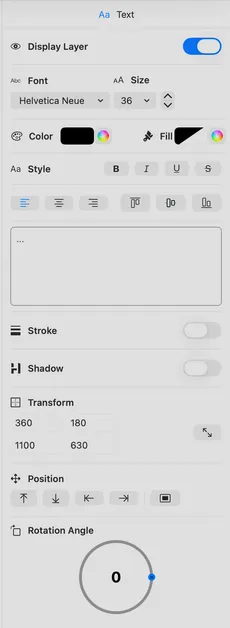
| Display Text | Display or hide text. |
| Font | Select the font to use. |
| Font Size | Select font size (6-200pt) using stepper or direct input. |
| Color | Text color. |
| Text styling | Bold, italic, underline, strikethrough. |
| Horizontal Alignment | Align text Left, Center, or Right. |
| Vertical Alignment | Align text Top, Middle, or Bottom. |
| Input | Text to display. |
| Background | Background fill color behind text. |
| Stroke | Toggle stroke outline with color picker and width control (1-15). |
| Shadow | Display text shadow, color, offset and blur. |
| Size | Width and height controls for the text element. |
| Position | Snap to position or center. |
| Rotation | Rotation angle in degrees around the bottom left of the element. |