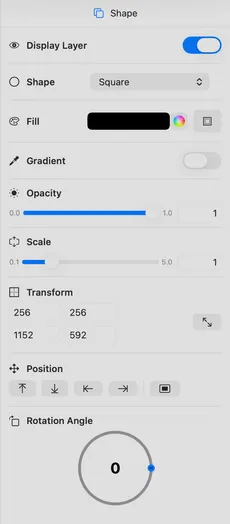
| Display Shape | Display or hide the shape. |
| Shape Type | Select shape: Square, Circle, RoundedRectangle, and more. |
| Shape Color | Shape color fill. |
| Stroke | Toggle stroke outline with width control (1-100). |
| Gradient | Toggle shape gradient with start/end color pickers. |
| Gradient Angle | Adjust gradient start and end angles (0-360°) with visual control. |
| Corner Radius | Adjust corner radius (0-500) for RoundedRectangle shape. |
| Size | Width and height of the shape. You can also resize in the editor. |
| Scale | Scale the shape. |
| Opacity | Shape transparency. |
| Position | Snap to position or center. |
| Rotation | Rotation angle in degrees around the bottom left of the element. |