
One Shots
A one shot is an effect that plays once and then gets out of the way: a zoom punch on a punchline, a flash on a cut, confetti at the end of the show. Until you fire it, the layer looks untouched. Camera Graph has 120 of them.
One shots are the only effects you can fire with a key or a MIDI pad. Any effect’s sliders can follow a MIDI fader or knob; see MIDI.
Add a one shot
Section titled “Add a one shot”Add it like any other effect: select a layer or scene, click Add Filter in the drawer, and pick from One Shots in the Filters window sidebar. The tiles there loop each one shot so you can see what it does. See Filters for the drawer, the card header, blend modes and stacking.
Fire it
Section titled “Fire it”| Trigger | How |
|---|---|
| Play button | Click ▶ beside Duration on the card. It turns green while the one shot plays. |
| Keyboard shortcut | Click the shortcut field on the card and press a key combination. Each one shot has its own. It fires when you release the keys. |
| MIDI | Click Learn in the card’s MIDI row, then hit a pad or key on your controller. See MIDI. |
| MCP | An AI assistant can call trigger_one_shot with an optional velocity from 1 to 127. See MCP Server. |
Firing a one shot while it is still playing starts it again from the beginning.
The keyboard shortcut works while Camera Graph is in the background, so pick a combination other apps don’t use.
One shot card
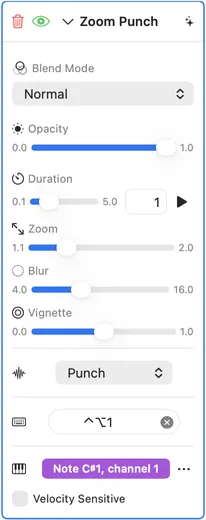
Section titled “One shot card”Below the standard Blend Mode and Opacity controls, every one shot card has:
| Control | What it does |
|---|---|
| Duration | How long the one shot plays, from 0.1 to 5 seconds. Drag the slider or type a value. |
| ▶ | Fires the one shot. |
| Settings | The one shot’s own controls, such as Zoom or Shake. |
| Easing | The curve the one shot follows over its duration. See below. |
| Shortcut | The keyboard shortcut that fires it. |
| MIDI | Learn maps a pad, key or button. Once mapped it shows the message, such as “Note C1, channel 1”. The ⋯ menu beside it has Any Channel and Clear MIDI Mapping. |
| Velocity Sensitive | When on, a softer pad hit plays the one shot more faintly. Off by default: MIDI plays it at full strength, like ▶. |
Easing
Section titled “Easing”Most one shots, such as Zoom Punch, take their strength from the easing curve:
| Curve | How it moves |
|---|---|
| Punch | Rises to full strength halfway through, then falls back, so the picture ends where it started. The default for these one shots. |
| Linear | Builds at a steady rate to full strength at the end, then the picture returns to normal. |
| Ease In | Builds slowly, then quickly, to full strength at the end. |
| Ease Out | Builds quickly, then slowly, to full strength at the end. |
| Ease In Out | Builds slowly at both ends, to full strength at the end. |
Other one shots play their own sequence: a shake that dies away, a burst of flashes, a load that runs top to bottom. Bass Drop, Earthquake, Flash Bang, Lightning Strike and Paparazzi are some of them. For these the curve sets how fast they move through their sequence. They default to Linear and don’t offer Punch, because Punch would play the sequence forward and then back. A project saved with Punch on one of them opens with Linear.
A few, such as Confetti, Film Leader and Meteor Strike, also default to Linear because they draw their own start and finish. They still offer Punch, which plays them forward and then back.
The gallery below shows each one shot’s default duration and easing.
Camera Graph listens to every connected MIDI device. The full guide, including MIDI Map Mode and Settings › MIDI, is MIDI. On the card:
- Click Learn in the MIDI row. It reads Listening….
- Hit a pad or key, or press a button on your controller. The cell shows what it learned, for example Note C1, channel 1.
- Hit it again to fire the one shot.
Click the cell again, or press Escape, to stop listening without learning anything. To forget the mapping, choose Clear MIDI Mapping from the ⋯ menu.
A note fires when it is pressed, a control change when it rises past the halfway value, and a program change when it arrives. Releases never fire.
A learned mapping listens on the channel it was learned on. Turn on Any Channel in the ⋯ menu to take the same note on every channel.
Velocity Sensitive makes the one shot follow how hard you hit the pad: full velocity (127) plays it at full strength, a softer hit plays it weaker. With it off, every hit plays at full strength. Only notes carry velocity; a control change or program change always plays at full strength.
What carries over
Section titled “What carries over”- Mappings are saved on this Mac, with your keyboard shortcuts, not in the project file.
- A one shot’s keyboard shortcut and MIDI mapping stay with it when you relaunch Camera Graph or reopen the project.
- If you swap a one shot for another with the name menu or ⌥←/⌥→, the new one keeps the shortcut and mapping.
- A duplicated one shot starts with no shortcut and no MIDI mapping.
- Notes learned on one shot cards in earlier versions are brought into the new MIDI mappings the first time you open the project, unless that one shot or that note is already mapped.
- Can one pad fire one shots on several layers at once?
No. A MIDI message drives one control. Learning a note that is already in use moves it to the new control, and the old one’s cell briefly shows “was” and its name. Give each one shot its own pad.
- Can MIDI control other things?
Yes. Scenes can go live, mixer tracks can be muted, soloed and faded, and any effect’s opacity and sliders can follow a fader or knob. Only one shots fire. See MIDI.
All one shots
Section titled “All one shots”Every one shot by category, with its default duration and easing, and its settings. Each clip plays the one shot once, then shows the picture at rest.
Color & Mood9
All categoriesColor Wash
A wave of color sweeps across with a glowing edge.
ParameterRange Default Duration 1 s Easing Punch Huerange 0–1 0.6 Saturationrange 0–2 1 Directionrange 0–360 0 Bloomrange 0–1 0.5 Dream Drift
Softens into pastel glow with a gentle sway.
ParameterRange Default Duration 1 s Easing Linear Bloomrange 0.1–1 0.4 Duotone Slam
Snaps to a hard two-color look with a zoom kick.
ParameterRange Default Duration 1 s Easing Punch Shadow Color #28056B Highlight Color #FF5172 Contrastrange 1–4 2.2 Zoom Kickrange 0–0.3 0.08 Euphoria Bloom
Colors oversaturate and bloom with rainbow halos.
ParameterRange Default Duration 1 s Easing Punch Saturationrange 1–3 1.5 Hue Tornado
Colors swirl into a spinning vortex of hue.
ParameterRange Default Duration 1.5 s Easing Punch Swirlrange 0–10 3 Hue Rangerange 0–1 1 Saturationrange 0–2 0.8 Spin Speedrange 0–5 1.5 Paint Bomb
Paint splatters burst out from the center.
ParameterRange Default Duration 1 s Easing Punch Splatsrange 3–15 8 Colorfulnessrange 0–1 0.8 Rage Flicker
Violent flicker between normal, red and negative.
ParameterRange Default Duration 1 s Easing Linear Intensityrange 0.3–1 0.8 Sin City
Snaps to high-contrast black and white, keeping one color.
ParameterRange Default Duration 2.5 s Easing Punch Hue Tolerancerange 0.02–0.3 0.08 Contrastrange 1–3 1.8 Grainrange 0–1 0.35 Kept Color #E51919 Spectrum Sweep
A rainbow band sweeps diagonally across the frame.
ParameterRange Default Duration 1.4 s Easing Linear Band Widthrange 0.1–1.5 0.7 Anglerange −1–1 0.35 Saturationrange 0–2 1 Edge Glowrange 0–2 1
Destruction & Reveal10
All categoriesCurtain Tear
The picture rips apart from the center with a bright glow.
ParameterRange Default Duration 1 s Easing Linear Tear Widthrange 0.1–0.6 0.3 Disintegrate
The picture dissolves into dust across the frame.
ParameterRange Default Duration 1 s Easing Punch Directionrange 0–1 0 Edge Consume
Darkness closes in from the edges, then lets go.
ParameterRange Default Duration 1 s Easing Punch Pull Strengthrange 0–1 0.3 Vignette Darknessrange 0–1 0.8 Elasticityrange 1–5 2 Phantom Wipe
A ghostly copy drifts upward and fades.
ParameterRange Default Duration 1 s Easing Linear Driftrange 0.02–0.3 0.2 Ghost Opacityrange 0.2–1 0.9 Pixel Explode
Blocks fly outward spinning, then reassemble.
ParameterRange Default Duration 1.2 s Easing Punch Blocksrange 6–40 16 Spreadrange 0.2–2 1 Spinrange 0–3 1 Scratch Card
Silver foil covers the frame, then gets scratched away.
ParameterRange Default Duration 2.8 s Easing Linear Brush Sizerange 0.5–2 1 Strokesrange 4–12 9 Sparklerange 0–1 0.7 Screen Crack
Cracks spread from the center with color fringing.
ParameterRange Default Duration 1 s Easing Punch Densityrange 2–20 8 Shatter Rain
The picture breaks into shards that fall away.
ParameterRange Default Duration 1 s Easing Punch Shard Sizerange 0.02–0.15 0.05 Shredder
Vertical strips separate, curl and fall, then reassemble.
ParameterRange Default Duration 1.4 s Easing Punch Stripsrange 6–40 18 Fallrange 0–1 0.6 Curlrange 0–1 0.6 Tear Strip
A strip peels away to show a glitched negative beneath.
ParameterRange Default Duration 1 s Easing Punch Strip Heightrange 0.05–0.4 0.15
Film & Analog11
All categoriesFilm Advance
The film strip scrolls a few frames with sprocket holes.
ParameterRange Default Duration 1 s Easing Linear Framesrange 1–6 3 Film Burn
A film burn light leak flares across the picture.
ParameterRange Default Duration 1 s Easing Punch Intensityrange 0–2 1 Warmthrange 0–1 0.7 Grainrange 0–1 0.3 Film Leader
A 3-2-1 countdown leader with a clock-wipe sweep.
ParameterRange Default Duration 3 s Easing Linear Flickerrange 0–1 0.6 Scratchesrange 0–1 0.6 Sepiarange 0–1 0.3 Film Projector
Old home-movie flicker, scratches and warm tint.
ParameterRange Default Duration 1 s Easing Linear Intensityrange 0.2–1 0.7 Focus Rack
Blurs out of focus, holds, then racks back sharp.
ParameterRange Default Duration 1 s Easing Linear Blurrange 1–20 8 Instant Develop
The picture develops like an instant photo, then returns to live.
ParameterRange Default Duration 3 s Easing Linear Borderrange 0–1 1 Warmthrange 0–1 0.6 Grainrange 0–1 0.35 Rewind Scratch
VCR rewind with tearing lines and scratches.
ParameterRange Default Duration 1 s Easing Linear Roll Speedrange 0.5–10 3 Tearrange 0–0.2 0.05 Scratchesrange 0–8 3 Slide Change
A slide projector change with a light pop and jiggle.
ParameterRange Default Duration 1.4 s Easing Linear Light Poprange 0–1 0.6 Dustrange 0–1 0.6 Jigglerange 0–1 0.6 Tape Warp
The tape drags and warps, with color bleed.
ParameterRange Default Duration 1 s Easing Punch Warprange 0.05–0.5 0.2 VHS Tracking
VHS tracking bands roll through the picture.
ParameterRange Default Duration 1 s Easing Punch Severityrange 0–1 0.7 Band Widthrange 0–0.5 0.15 Color Bleedrange 0–1 0.5 Noiserange 0–1 0.6 Whip Pan
A fast sideways smear that settles back.
ParameterRange Default Duration 1 s Easing Linear Blurrange 0.05–0.5 0.15
Glitch & Digital16
All categoriesBlue Screen
Glitches into a crash screen, then reboots.
ParameterRange Default Duration 2.5 s Easing Linear Glitchrange 0–2 1 Text Sizerange 0.5–1.5 1 CRTrange 0–1 0.3 Screen Color #0077D6 Boot Sequence
Goes black, then green scan lines load the picture back in.
ParameterRange Default Duration 1 s Easing Linear Scan Colorrange 0–1 0 Buffering
Freezes blocky and gray with a loading spinner, then snaps back.
ParameterRange Default Duration 2 s Easing Linear Block Sizerange 0.01–0.08 0.03 Desaturaterange 0–1 0.8 Darkenrange 0–1 0.45 Spinner Sizerange 0.5–2 1 Spinner Color #FFFFFF Channel Surf
Flips through a few retro channels with static between.
ParameterRange Default Duration 1 s Easing Linear Channelsrange 2–6 4 Codec Collapse
Breaks into compression blocks and banding, then rebuilds.
ParameterRange Default Duration 1 s Easing Punch Block Sizerange 4–32 16 Data Drain
Color drains downward like liquid.
ParameterRange Default Duration 1 s Easing Linear Speedrange 0.5–2 1 Dial Up
The picture loads line by line from the top.
ParameterRange Default Duration 1 s Easing Linear Line Widthrange 0–0.02 0.01 Dimension Shift
Horizontal slabs slide apart with color splits, then realign.
ParameterRange Default Duration 1 s Easing Punch Slabsrange 2–16 7 Shiftrange 0–0.5 0.18 RGB Splitrange 0–0.05 0.01 Hue Shiftrange 0–1 0.4 Firewall Breach
A hexagon shield shatters with red flashing cells.
ParameterRange Default Duration 1 s Easing Linear Hex Sizerange 0.02–0.15 0.05 Glitch Bomb
A burst of block glitches that resolves back.
ParameterRange Default Duration 1 s Easing Linear Chaosrange 0–1 0.8 Block Sizerange 2–64 16 Channel Swaprange 0–1 0.5 Holodeck Fail
Flickers between the picture and a glowing grid.
ParameterRange Default Duration 1 s Easing Linear Grid Sizerange 10–80 30 Flicker Raterange 5–30 15 Pixelate Crush
Crushes into giant pixels and back.
ParameterRange Default Duration 1 s Easing Punch Min Pixelsrange 4–64 12 Color Levelsrange 2–32 8 Pixel Sort
Pixels smear into sorted streaks, then settle.
ParameterRange Default Duration 1 s Easing Punch Thresholdrange 0–1 0.25 Directionrange 0–6.28 0 Streak Lengthrange 0–1 0.6 Quantum Flicker
Ghost copies flicker around the picture.
ParameterRange Default Duration 1 s Easing Punch Copiesrange 2–6 3 Spreadrange 0.01–0.15 0.05 Signal Loss
Tears, rolls into color bars and static, then snaps back.
ParameterRange Default Duration 1.6 s Easing Linear Tearrange 0–2 1 Rollrange 0–5 2 Staticrange 0–1 0.35 Static Burst
A burst of TV static and lost sync.
ParameterRange Default Duration 1 s Easing Punch Staticrange 0–1 0.8 Sync Lossrange 0–1 0.5 Interlacerange 0–1 0.6
Impact & Shake11
All categoriesBass Drop
Squashes down, then snaps back with a bounce.
ParameterRange Default Duration 1 s Easing Linear Amountrange 0.1–0.6 0.3 Earthquake
Splits along a fault line and shakes apart.
ParameterRange Default Duration 1 s Easing Linear Magnituderange 0.01–0.15 0.05 Impact Frame
Anime impact frames with ink flashes and speed lines.
ParameterRange Default Duration 0.9 s Easing Linear Strobe Framesrange 3–24 10 Thresholdrange 0.1–0.9 0.45 Speed Linesrange 0–1 0.6 Shakerange 0–0.1 0.04 Flash Color #FF1919 Impact Shake
A hard camera shake with a zoom punch.
ParameterRange Default Duration 1 s Easing Linear Shakerange 0–50 20 Frequencyrange 1–50 25 Zoomrange 0–0.5 0.1 Decayrange 1–10 5 Implosion Crunch
Edges crumple inward like a crushed can.
ParameterRange Default Duration 1 s Easing Punch Strengthrange 0.1–1 0.5 Jelly Wobble
Squashes and jiggles like jelly, then settles.
ParameterRange Default Duration 1.2 s Easing Linear Frequencyrange 1–8 2.5 Dampingrange 0–10 1.5 Amountrange 0–1 0.6 Meteor Strike
A flaming meteor streaks in and explodes.
ParameterRange Default Duration 2.4 s Easing Linear Sizerange 0.5–2 1 Shakerange 0–0.08 0.03 Crater Glowrange 0–2 1 Fire Color #FF7F26 POW Impact
A comic-book starburst hit.
ParameterRange Default Duration 1 s Easing Punch Burst Sizerange 0.2–1 0.6 Posterizerange 2–12 6 Shockwave
A ring expands outward and warps the picture.
ParameterRange Default Duration 1 s Easing Linear Displacementrange 0–0.5 0.1 Ring Widthrange 0–0.3 0.1 Center Xrange 0–1 0.5 Center Yrange 0–1 0.5 Chromaticrange 0–0.05 0.02 Spotlight Slam
The screen goes dark with a single spotlight.
ParameterRange Default Duration 1 s Easing Linear Spot Sizerange 0.1–0.6 0.3 Zoom Punch
A quick zoom hit with motion blur, then back.
ParameterRange Default Duration 1 s Easing Punch Zoomrange 1.1–2 1.3 Blurrange 4–16 8 Vignetterange 0–1 0.5
Light & Flash15
All categoriesAscension
Golden rays, a halo and floating dust in heavenly light.
ParameterRange Default Duration 2 s Easing Punch Raysrange 0–3 1.3 Liftrange 0–1 0.65 Dust Motesrange 0–2 1 Halorange 0–2 1 Light Color #FFD87F Electrocute
Electric arcs crawl along the edges with strobing.
ParameterRange Default Duration 1.2 s Easing Punch Arcsrange 0–3 1.5 Stroberange 0–1 0.5 Jitterrange 0–1 0.5 Glow Color #59A5FF EMP Burst
A CRT power-down collapse, like an electronic failure.
ParameterRange Default Duration 1 s Easing Punch Collapse Speedrange 1–10 3 Line Brightnessrange 0.5–5 2 Desaturationrange 0–1 1 Flare Sweep
A huge lens flare sweeps across the frame.
ParameterRange Default Duration 1.4 s Easing Linear Streak Lengthrange 0.3–2 1 Ghostsrange 0–2 1 Bloomrange 0–1.5 0.6 Heightrange 0–1 0.42 Flare Color #4C99FF Flash Bang
A white-out flash that fades back with a warm glow.
ParameterRange Default Duration 1 s Easing Linear Intensityrange 0.5–1 0.8 Warmthrange 0–1 0.3 Bloomrange 0–20 5 Laser Show
Concert lasers fan out from the bottom through haze.
ParameterRange Default Duration 2 s Easing Punch Beamsrange 2–16 8 Sweep Speedrange 0–3 1 Beam Widthrange 0.5–4 1.5 Hazerange 0–1 0.6 Color A #19FF3F Color B #FF19BF Light Leak Burst
A horizontal flare streak with ghost reflections.
ParameterRange Default Duration 1 s Easing Punch Intensityrange 0–2 1 Streakrange 0–0.5 0.15 Warmthrange 0–1 0.6 Ghostsrange 0–5 2 Lightning Strike
A branching bolt strikes from the top with a flash.
ParameterRange Default Duration 1 s Easing Linear Intensityrange 0.3–1 0.8 Neon Pulse
Edges flare up in a neon glow.
ParameterRange Default Duration 1 s Easing Punch Huerange 0–1 0.8 Glowrange 0–10 3 Thresholdrange 0.05–0.8 0.2 Desaturationrange 0–1 0.7 Paparazzi
Camera flashes go off from different angles.
ParameterRange Default Duration 1 s Easing Linear Flashesrange 2–8 4 Plasma Burst
Electric plasma tendrils burst outward.
ParameterRange Default Duration 1 s Easing Punch Tendrilsrange 3–20 8 Glowrange 0–1 0.8 Solar Flare
A warm orange eruption washes in from the edge.
ParameterRange Default Duration 1 s Easing Linear Intensityrange 0.3–1 0.7 Solarize Pop
A darkroom solarize flash that inverts the highlights.
ParameterRange Default Duration 1 s Easing Punch Thresholdrange 0–1 0.5 Contrastrange 1–3 1.5 Channel Moderange 0–1 0 Strobe Slice
Bands strobe between the picture and black or white.
ParameterRange Default Duration 1 s Easing Linear Bandsrange 2–12 6 Supernova
A flash bursts into rays and an expanding shock ring.
ParameterRange Default Duration 1.6 s Easing Linear Raysrange 4–32 14 Whiteoutrange 0–1 0.85 Shock Ringrange 0–2 1 Tint #FFCC8C
Motion & Energy14
All categoriesAnxiety Spiral
Tunnel vision closes in, warping and draining color.
ParameterRange Default Duration 1 s Easing Linear Intensityrange 0.3–1 0.7 Barrel Roll
A fast full spin of the frame with motion blur.
ParameterRange Default Duration 0.9 s Easing Linear Turnsrange 1–3 1 Motion Blurrange 0–1 0.8 Zoom Outrange 0–0.8 0.35 BPM Stutter
Freezes, then stutters through offset copies.
ParameterRange Default Duration 1 s Easing Linear Stuttersrange 2–8 4 Amountrange 0.01–0.15 0.05 Heartbeat
A double pulse with a warm red vignette.
ParameterRange Default Duration 1 s Easing Linear Strengthrange 0.02–0.2 0.08 Hyperspace
Stars streak into a jump to lightspeed.
ParameterRange Default Duration 1.6 s Easing Linear Stretchrange 0–1 0.7 Starsrange 0–3 1.2 Flashrange 0–1.5 1 Record Scratch
Scrubs back and forth like a DJ scratch.
ParameterRange Default Duration 0.9 s Easing Punch Scrubrange 0–0.5 0.18 Scratchesrange 1–8 3 Smearrange 0–1 0.7 Desaturaterange 0–1 0.35 Sidechain Pump
Darkens and squeezes in, then pumps back out.
ParameterRange Default Duration 1 s Easing Linear Pumprange 0.05–0.4 0.15 Speed Lines
Anime-style radial speed lines.
ParameterRange Default Duration 1 s Easing Punch Line Countrange 10–200 60 Thicknessrange 0.1–0.9 0.5 Focal Xrange 0–1 0.5 Focal Yrange 0–1 0.5 Background Dimrange 0–1 0.3 Sub Rumble
A low, wobbling rumble with soft edges.
ParameterRange Default Duration 1 s Easing Linear Amountrange 0.01–0.05 0.02 Frequencyrange 1–8 3 Teleport
Beams out in shimmering columns, then rematerializes.
ParameterRange Default Duration 2 s Easing Linear Beam Color #72CCFF Column Sizerange 0.5–2 1 Particlesrange 0–1 0.8 Glowrange 0–2 1 Tidal Surge
A big wave sweeps across, carrying the picture with it.
ParameterRange Default Duration 1 s Easing Punch Wave Heightrange 0.05–0.4 0.15 Time Stop
A shock sphere freezes everything gray-blue, then color returns.
ParameterRange Default Duration 2.5 s Easing Linear Shock Widthrange 0.02–0.4 0.12 Distortionrange 0–0.12 0.04 Freeze Tintrange 0–1 0.8 Wire Pulse
Flashes into a neon wireframe outline on black.
ParameterRange Default Duration 1 s Easing Linear Colorrange 0–2 0 X-Ray Pulse
Flashes into an inverted X-ray with bright edges.
ParameterRange Default Duration 1 s Easing Punch Inversionrange 0–1 1 Edge Intensityrange 0–2 0.7 Contrastrange 1–3 1.5
Overlay & Atmosphere10
All categoriesConfetti
Confetti bursts from the bottom corners or the center.
ParameterRange Default Duration 2.6 s Easing Linear Amountrange 0.2–1 1 Piece Sizerange 0.5–2 1 Bottom to Centerrange 0–1 0 Powerrange 0.5–1.5 1 Double Vision
Blurry double or triple vision, then back into focus.
ParameterRange Default Duration 1 s Easing Punch Offset Amountrange 0–0.15 0.04 Copy Countrange 2–4 3 Blur Amountrange 0–0.01 0 Directionrange 0–6.28 0 Feedback Echo
Echoes of the picture zoom into a tunnel.
ParameterRange Default Duration 1 s Easing Punch Echoesrange 2–8 5 Zoomrange 0.01–0.15 0.05 Color Driftrange 0–1 0.3 Fireworks
Fireworks burst with trails and crackling sparks.
ParameterRange Default Duration 3 s Easing Linear Burstsrange 2–4 3 Burst Sizerange 0.5–1.5 1 Cracklerange 0–1 0.7 Sky Dimrange 0–0.8 0.5 Force Shield
A hexagon energy shield ripples from an impact.
ParameterRange Default Duration 1 s Easing Punch Hex Scalerange 5–40 15 Shield Opacityrange 0–1 0.7 Frost Creep
Frost grows in from the edges, then melts away.
ParameterRange Default Duration 1 s Easing Linear Frost Depthrange 0.1–0.5 0.3 Heat Shimmer
Wavy heat haze ripples through the picture.
ParameterRange Default Duration 1 s Easing Punch Distortionrange 0–0.1 0.02 Frequencyrange 1–30 10 Speedrange 0.5–5 2 Vertical Biasrange 0–1 0.8 Hologram Flicker
Flickers into a sci-fi hologram projection.
ParameterRange Default Duration 1 s Easing Punch Tint Huerange 0–1 0.55 Scanlinesrange 50–500 200 Flicker Raterange 1–30 10 Edge Glowrange 0–2 0.8 Make It Rain
Hundred-dollar notes pour down in twisting layers that catch the light.
ParameterRange Default Duration 5 s Easing Linear Amountrange 0.2–2 0.7 Bill Sizerange 0.6–1.5 1 Fall Speedrange 0.5–3 1 Spinrange 0–4 1 Twistrange 0–4 1 Shimmerrange 0–1 0.8 Backlightrange 0–1 0.6 Smoke Bomb
Thick smoke bursts from the bottom, fills the frame and clears.
ParameterRange Default Duration 3 s Easing Linear Smoke Color #DBDBE5 Densityrange 0.3–1 0.9 Billowrange 0–1 0.6
Stylized10
All categoriesEnhance
A crime-show zoom-and-enhance with a scan line and reticle.
ParameterRange Default Duration 2.2 s Easing Linear Target Xrange 0–1 0.5 Target Yrange 0–1 0.4 Zoomrange 1.5–6 3 Pixelationrange 0–1 1 Ink Drop
Ink spreads in from the edges, then recedes.
ParameterRange Default Duration 1 s Easing Punch Ink Redrange 0–1 0 Ink Greenrange 0–1 0 Ink Bluerange 0–1 0.1 Noise Scalerange 1–20 5 Opacityrange 0–1 0.8 Spread Speedrange 0.5–3 1 Manga Zoom
Manga focus lines with high contrast.
ParameterRange Default Duration 1 s Easing Punch Line Countrange 30–200 80 Contrastrange 1–3 1.5 Matrix Cascade
Green code rains down over a green-tinted picture.
ParameterRange Default Duration 1 s Easing Linear Densityrange 10–60 30 Panel Smash
The picture splits into comic panels that slam in.
ParameterRange Default Duration 1 s Easing Punch Panelsrange 2–8 4 Gutter Widthrange 0.01–0.05 0.02 RGB Split Smash
A hard red, green and blue split with scan lines.
ParameterRange Default Duration 1 s Easing Punch Splitrange 0–100 30 Anglerange 0–360 0 Scanlinerange 0–1 0.3 Sketch Reveal
Becomes a pencil sketch, then color washes back in.
ParameterRange Default Duration 3 s Easing Linear Linesrange 0–2 1.2 Hatchingrange 0–1 0.6 Paperrange 0–1 0.5 Snapshot
A shutter flash, then a tilted instant photo drops in and out.
ParameterRange Default Duration 2.4 s Easing Linear Tiltrange 0–20 7 Flashrange 0–1 1 Borderrange 0–1 1 Title Burn
A bright line sweeps across in high-contrast gray.
ParameterRange Default Duration 1 s Easing Linear Line Widthrange 0.01–0.08 0.02 Warhol Grid
A pop-art grid with a different palette in each tile.
ParameterRange Default Duration 1.5 s Easing Punch Grid Sizerange 2–4 2 Ink Levelsrange 2–6 4 Contrastrange 0.5–2.5 1.4 Halftonerange 0–1 0.35
Warp & Distortion14
All categoriesAcid Melt
Psychedelic color cycling and melting warps.
ParameterRange Default Duration 1 s Easing Punch Hue Speedrange 0–5 2 Meltrange 0–0.1 0.03 Saturationrange 0–1 0.5 Foldsrange 0–8 0 Barrel Blast
The picture bulges out in a barrel blast.
ParameterRange Default Duration 1 s Easing Linear Distortionrange 0–5 2 Chromatic Splitrange 0–1 0.3 Oscillationsrange 1–3 1 Dolly Zoom
A vertigo zoom: the center holds while the edges zoom away.
ParameterRange Default Duration 1.4 s Easing Punch Amountrange −1–1 0.8 Hold Radiusrange 0–0.6 0.15 Zoom Blurrange 0–2 1.2 Vignetterange 0–1 0.5 Event Horizon
A black hole forms at the center and bends the picture.
ParameterRange Default Duration 2 s Easing Punch Hole Sizerange 0.05–0.4 0.2 Swirlrange 0–10 4 Accretionrange 0–2 1 Disk Color #FF8C26 Gravity Crush
Pixels get sucked to the center, then blast outward.
ParameterRange Default Duration 1 s Easing Linear Strengthrange 0.1–1 0.5 Kaleido Burst
Bursts into spinning kaleidoscope segments and back.
ParameterRange Default Duration 1.5 s Easing Punch Segmentsrange 3–24 8 Spinrange 0–3 1 Zoomrange 0–1 0.35 Rim Glowrange 0–2 1 Lens Shatter
Radial cracks split the picture into tinted shards.
ParameterRange Default Duration 1 s Easing Linear Cracksrange 4–24 12 Mercury Pool
A shiny liquid-metal surface rises and recedes.
ParameterRange Default Duration 1 s Easing Punch Wave Frequencyrange 2–20 8 Reflectivityrange 0–1 0.7 Paper Fold
Folds in half like paper, then unfolds.
ParameterRange Default Duration 1.6 s Easing Punch Fold Anglerange 0–1 0.69 Perspectiverange 0–2 1 Shadingrange 0–1 0.7 Paper Color #F2EDE0 Prism Fracture
Breaks into prism cells with rainbow edges.
ParameterRange Default Duration 1 s Easing Linear Cell Countrange 4–64 16 Displacementrange 0–0.1 0.03 Rainbow Edgerange 0–1 0.6 Spiral Vortex
A twirling spiral pulls the picture around.
ParameterRange Default Duration 1 s Easing Punch Twistrange 0–15 5 Radiusrange 0.1–2 0.8 Center Xrange 0–1 0.5 Center Yrange 0–1 0.5 Thermal Pulse
A pulse of thermal-camera false color.
ParameterRange Default Duration 1 s Easing Punch Palette Intensityrange 0–2 1 Hot Thresholdrange 0.2–1 0.7 Cold Shiftrange 0–0.5 0.2 Tunnel Dive
Flies into an endless tunnel of the picture, then pops out.
ParameterRange Default Duration 2.5 s Easing Linear Depthrange 1–6 3 Twistrange −1–1 0.25 Zoom Blurrange 0–2 1 Rib Glowrange 0–2 0.8 Rib Color #4CE5FF Warp Gate
A circular portal of swirling energy opens.
ParameterRange Default Duration 1 s Easing Punch Radiusrange 0.1–0.8 0.4 Swirlrange 0–10 3 Edge Glowrange 0–1 0.8