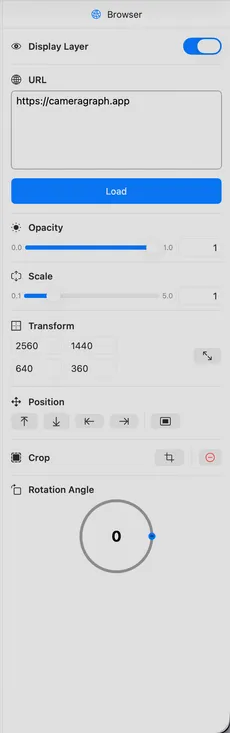
| Display Browser |
Display or hide the browser. Turning it off will also close the browser window and free up the associated memory. |
| URL |
URL to load in the browser. The browser is created underneath Camera Graph if you need to interact with it. |
| Load |
Button to reload the current URL. Shows loading indicator while page loads, error indicator on failure. |
| Size |
Width and height of the browser. You can also resize in the editor. |
| Crop |
Crop the browser window. Delete the crop. |
| Scale |
Scale the window. |
| Opacity |
Browser transparency. |
| Position |
Snap to position or center. |
| Rotation |
Rotation angle in degrees around the bottom left of the element. |
| Draw Offscreen |
Move the rendering window offscreen. |